


How To Master Product Programming With A Delem Press Brake
Delem Press Brake programming is one of the most important skills in daily bending work because it directly affects accuracy, Repetibilidade, Velocidade de configuração, and operator efficiency. In many workshops, the difference between a smooth production run and repeated correction often starts at the controller.
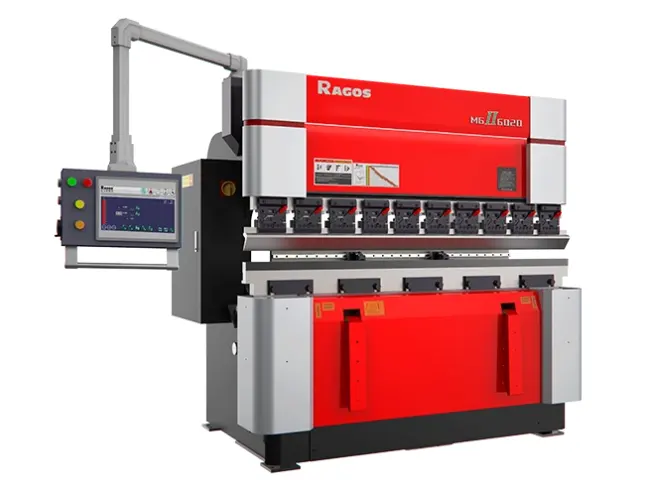
For operators, programmers, and production managers, strong programming habits matter just as much as machine structure or tooling quality. A well-programmed part helps reduce trial bends, keeps bend order clear, and makes it easier to maintain stable results across repeat jobs. That is why learning how to use a Delem Press Brake properly is not only a technical task. It is also a practical way to improve throughput on the shop floor.
Entering the Program Mode
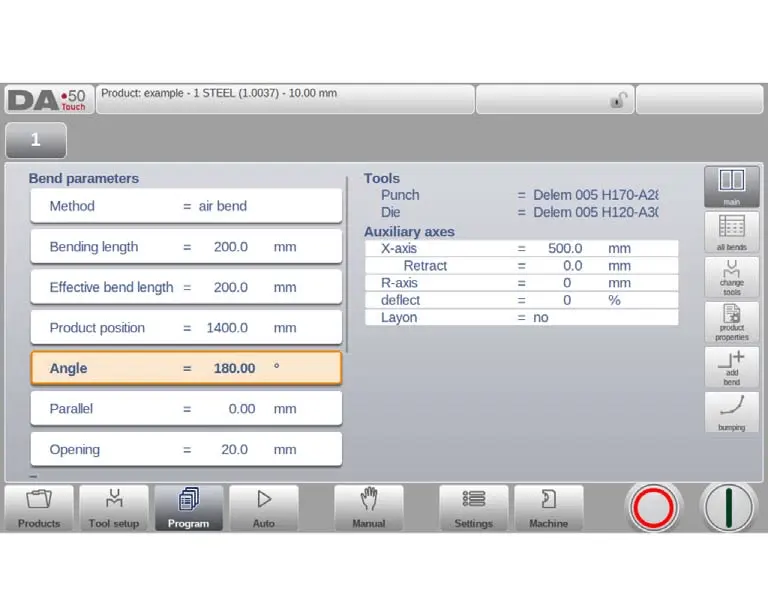
The first step in working with a Delem Press Brake is entering the product or program mode. From this screen, the operator can build a new part program or edit a program that is already saved.
In normal production, there are two common starting points:
• Open an existing product from the product overview
• Create a new program for a fresh part
• Confirm the product data and tool setup
• Enter the bend programming screen
Once inside the program page, the operator can view the active bend sequence and move between bend steps using the bend selector. This layout makes it easier to inspect one bend at a time without losing sight of the overall program structure.
On most Delem interfaces, the side buttons provide quick access to the main programming areas. These often include the main bend data page, the full bend table, product properties, Mudanças nas ferramentas, bend insertion, and bumping functions. When used correctly, these shortcuts save time during programming and during later adjustments on repeat work.
Compreensão the Main Programming Views
A Delem Press Brake program is usually managed through several connected views rather than one single screen. Each view serves a different purpose in the programming process.
The main view is where the operator edits the active bend step. This is the screen used most often during initial programming and troubleshooting. It shows the primary values for the chosen bend and allows quick direct input.
The All Bends view lists every bend step in a table, making it easier to review the full sequence, compare bends, rearrange their order, or edit the complete program more efficiently.
The Product Properties page keeps the basic product information for the part. These values are not linked to only one bend. Em vez disso, they define the part as a whole, including identification and material-related information.
The tool-change area is used when the tooling needs to be updated for one bend or for the full program. This becomes especially useful when a job is revised for a different die opening, punch profile, or production method.
Key Parameters That Shape Each Bend
Every bend step inside a Delem Press Brake program contains a group of parameters that define how the machine will perform that bend. Understanding these values thoroughly helps the operator improve adjustment speed and achieve more consistent bending performance.
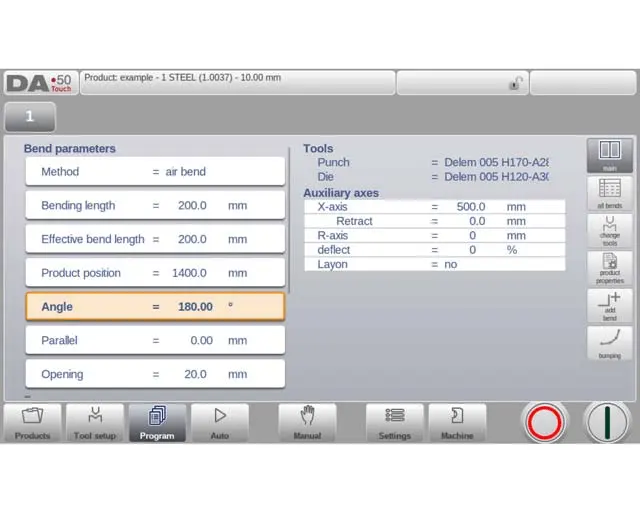
- Bend Method
The selected bend method changes how the machine calculates and executes the bend. Common methods include air bending, Bottoming, and hemming. Each method requires different logic for beam position and force behavior.
Air bending is commonly used for flexible angle programming because the machine calculates the required Y-axis depth according to the target angle. Bottoming pushes the sheet more firmly into the die and depends more heavily on force conditions. Hemming is used when the flange must be folded over, so the beam position must account for the die surface and sheet thickness.
- Comprimento, Position, and Angle
Bending length is important because it affects force demand and crowning calculation. Effective bend length may also be applied in load calculation when more than one bend line is involved in the part.
Product position specifies the part location in the Z direction with reference to the machine datum. Correct positioning helps maintain alignment during longer or more detailed programs.
For angle-based programming, the target angle is one of the most important entries. In angle mode, the system calculates the beam position automatically. In absolute position mode, the programmer sets the bend depth directly.
- Beam Movement Settings
Several settings control how the beam behaves during and after the bend:
• Mute: the change point from fast approach to pressing speed
• Opening: the gap after bending for easier part handling
• Parallel: correction between left and right cylinder sides
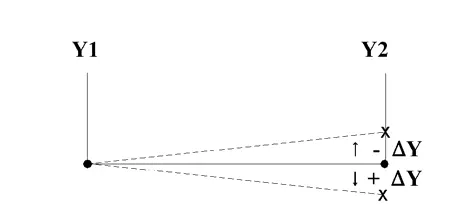
• Dwell time: hold time at the bend point
• Decompression: release distance after pressing
• Speed: pressing speed during the working stroke
• Decomp speed: speed during decompression movement
These values may look secondary at first, but in real production they strongly affect consistency, handling comfort, and cycle efficiency.
Additional Functions That Improve Flexibility
A Delem Press Brake controller also includes step-level functions that help operators handle more complex production conditions.
Repetition settings allow a bend to be skipped or repeated several times. This can be useful in special forming logic or chain-style operations.
Wait-for-retract settings control whether the beam continues immediately or pauses until the retract action is completed. This improves coordination between beam movement and gauge motion.
Step codes determine when new parameter values become active. Depending on the programming logic, a value change may take effect at decompression, muting position, upper dead point, or through an external signal. Delay time can also be added when a brief pause is needed before the next step begins.
These functions are not always used in simple jobs, but they become valuable when handling advanced sequences or integrating machine motion more carefully.
Managing Product Properties umnd Tool Data
Good program organization starts with clean product data. On a Delem Press Brake, the product properties page allows the operator to define the part ID, product description, Espessura da folha, Tipo de material, and angle selection mode.
This information matters for several reasons. Primeiro, it keeps the program library easier to search. Segundo, it supports correct calculation behavior. Terceiro, it helps the next operator understand the job without reopening every bend step.
Tool data is equally important. The real machine's tooling must correlate with the assigned punch and die for the program. The operator can make a tooling change by modifying either one bend step or the entire program, depending on how it affects production.
Depending on the machine configuration, some of the following may apply: Auxiliary axis data, retraction distances, axis speeds, and lay-on options. When these are programmed properly, backgauge movement becomes more stable and better matched to the real handling process.
Usando the All Bends View More Efficiently
The all-bends screen gives a full table overview of the program. This is often the fastest place to edit a multi-step part because it lets the operator review the bend sequence as a whole.
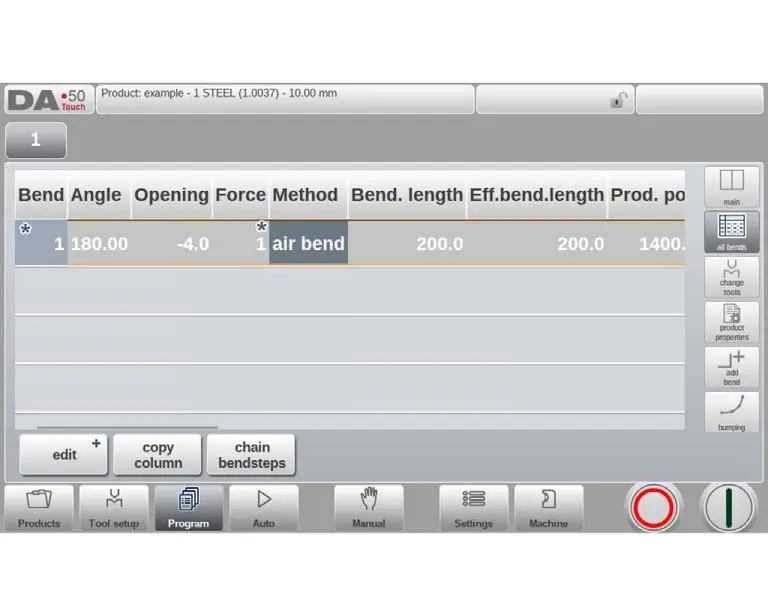
From here, the operator can usually:
• Insert a new bend
• Mark a bend for action
• Delete an unwanted bend
• Move a bend to another position
• Swap two bends
• Copy one column value to all bends
• Chain bend steps with repetition and offset settings
For longer programs, this view is often more practical than editing one bend at a time. It makes sequence correction faster and reduces the risk of overlooking a step.
Using Bumping for Large Radius Work
One useful function on a Delem Press Brake is bumping. This turns a normal bend step into a series of smaller bends used to create a large radius.
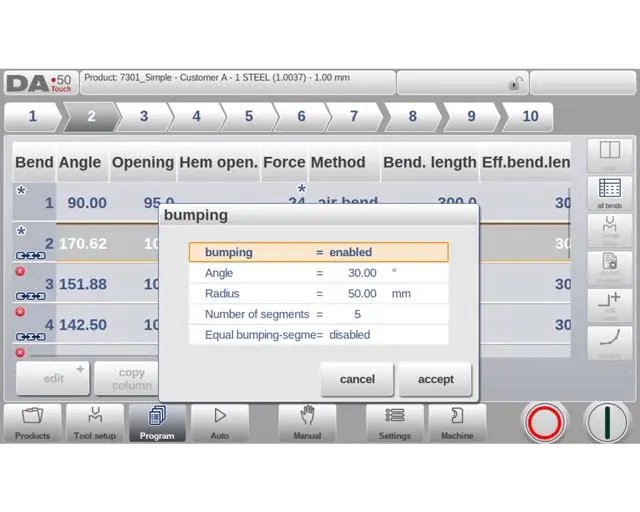
Instead of one sharp bend, the controller divides the shape into multiple segments. The operator can define the angle, target radius, and number of segments. More segments usually create a smoother radius, although they may also require a smaller die opening and more machine time.
Some controls also allow equal segment sizing, while others use smaller first and last segments for a more natural curve. This feature is especially useful for radius work where appearance and shape continuity matter.
Reading Programming Symbols Correctly
During programming, the controller may show symbols that help the operator understand what is happening inside the program logic.
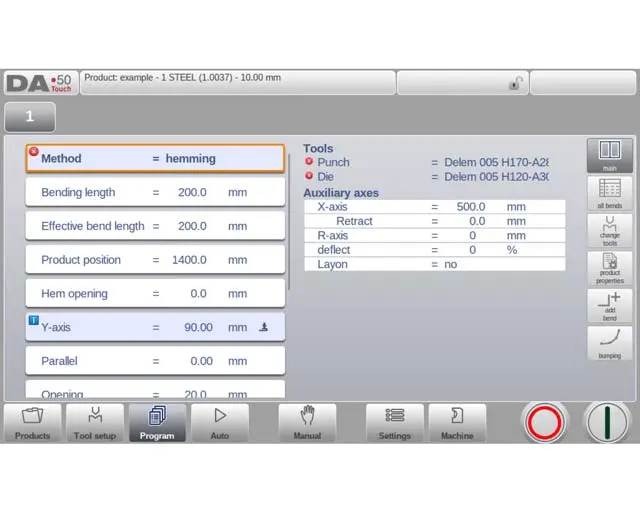
An information symbol usually means a value changed because another related parameter was edited first. The star symbol indicates the programmed value is different from the calculated value. An error symbol indicates that something is wrong with the program (por exemplo, a bending method that does not correspond to the tools assigned).
These graphics simplify the work a lot. Operators may be able to find inconsistencies sooner and resolve them before going into production.
Perguntas Freqüentes
• How Can I Improve Programming Accuracy On A Delem Press Brake?
Pay attention to the main parameters and see how the controller recalculates the correlated values. When saving the program, check the bending method, ângulo, tool, and material
• Is It Better To Edit One Bend At A Time Or Use The Full Table?
For small parts, single-bend editing is often enough. For most multi-step operations, the all-bends table usually is faster and provides the best overview of the entire operation.
• When Should I Use Bumping?
If the part requires a larger radius instead of a single sharp bend, bumping is the appropriate method. This is especially true for aesthetic parts, panels that are curved, and in the case of a need for a smoother profile.
Conclusão
Learning to program a Delem Press Brake well is not only about entering values on a screen. It is about understanding how bend method, ferramental, beam movement, and sequence logic work together in actual production. Once that understanding becomes part of daily practice, programming gets faster, corrections become smaller, and repeat jobs become easier to manage.
For manufacturers aiming at stable quality and better operator efficiency, this is where good controller knowledge starts to pay back. Na JS RAGOS, we see Delem-based programming as an important part of modern bending performance because accurate software logic supports accurate machine results.